
Automation
Why Automating Small Tasks Delivers the Biggest Impact
A practical look at how removing repeated manual steps can save time, reduce mistakes, and make everyday IT support more reliable.
Introduction
Most IT inefficiencies are not caused by major outages or failed systems. They come from small manual tasks repeated hundreds of times over months or years.
A few minutes here and there does not sound significant until those interruptions are spread across multiple users, devices, support requests, and daily routines. At that point, the real cost is no longer just time. It becomes lost concentration, inconsistent processes, avoidable mistakes, and support work that scales poorly.
That is why some of the most valuable automations in IT are also the simplest.
Good Candidates for Automation
This is exactly the kind of task that is worth automating. It has a clear input, a clear output, and a repeatable process. I do not need a large system or complicated interface. I just need a reliable way to ask the computer what monitors are connected and return the serial numbers.
That is where a small script makes sense. The script queries the computer, retrieves the serial numbers for the connected monitors, and gives me the information I need for the asset record.
In many support environments, reliability is usually more valuable than complexity. A small tool that gives the same useful answer every time can be more valuable than a larger solution that is harder to maintain.
A Practical Example
The script itself is simple, but the impact is useful. Instead of relying on packaging or physically checking the back of each screen, I can run the script in the background and collect the monitor serial numbers without disrupting the person using the machine.
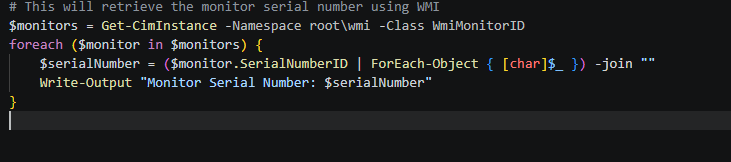
The user can continue working, I get the asset information I need, and the record can be updated with less guesswork. It also removes the risk of misreading a small sticker, writing the number down incorrectly, or having to go back because the original note was unclear.
Another Example: Staff Offboarding
Another area where small automation can make a big difference is staff offboarding. When someone leaves a business, there are usually several accounts, access rights, and systems that need to be updated. If every step is handled manually, the process depends heavily on people remembering each action and completing it in the right order.
Even automating one part of that workflow can improve consistency. For example, an account can be disabled and then moved into a dedicated deactivated users folder. That creates a clear structure: accounts in that folder are known to be disabled, and the process is followed the same way each time.
This also helps when a business needs to demonstrate control during accreditation or audit checks. If asked how the offboarding process is followed consistently, it is much stronger to explain that key steps are automated than to rely only on memory, habit, or an informal checklist.
Small Delays Become Operational Problems
One of the reasons small automations matter so much is that IT support is rarely made up of one large task at a time. Most days involve dozens of smaller interruptions competing for attention: password resets, asset checks, onboarding tasks, software installs, access requests, device setup, account changes, and troubleshooting.
Individually, many of those tasks only take a few minutes. The problem is the constant switching between them. Every manual step adds friction, increases the chance of mistakes, and breaks concentration for both the technician and the user.
That is why even small improvements can have a noticeable operational impact. Removing a repetitive step does not just save the time taken to complete that task. It also reduces interruptions, improves consistency, and makes support work easier to manage at scale.
Over time, those small efficiencies accumulate into a smoother and more reliable support process overall.
Why the Impact Adds Up
This is why small automations can have a bigger impact than they first appear to. The script does not transform the whole IT environment, but it removes an annoying manual step from a task that needs to be accurate.
It saves time, reduces interruption, improves consistency, and makes asset updates easier to complete properly. Those benefits matter because IT work is often made up of many small tasks like this, not just large projects.
Keeping Automation Practical
The aim is not to automate everything for the sake of it. The aim is to remove avoidable manual work where the process is predictable and the result needs to be consistent.
For this kind of script, practical matters more than impressive. It should be easy to run, easy to understand, and safe enough that it can be used during normal support work without creating extra risk.
A simple script that people actually use is often more valuable than a larger solution that becomes difficult to maintain.
Final Thoughts
Small automations are often overlooked because they do not look impressive on paper, but they are usually the changes that improve day-to-day IT operations the most.
Removing repeated manual steps saves time, reduces mistakes, and creates more consistent support processes without needing large or complicated systems.
In many cases, the best automation is simply the one that solves a recurring problem cleanly and reliably.